
Overview
The Home Report Requests widget allows you to view and manage home report requests and enquiries from ESPC and your own website (if implemented) in one place.
Where to Find the Widget
The Home Report Requests widget is available on the All tab for each property.
It displays a list of home report requests received for that property, along with the enquirer’s details and message.
What Information Is Displayed
Each enquiry includes the following information:
- Enquirer – Name of the person who submitted the enquiry
- Contact Details – Email address and/or telephone number
- Message – The message submitted through ESPC or your website
- Date Requested – The date and time the enquiry was received
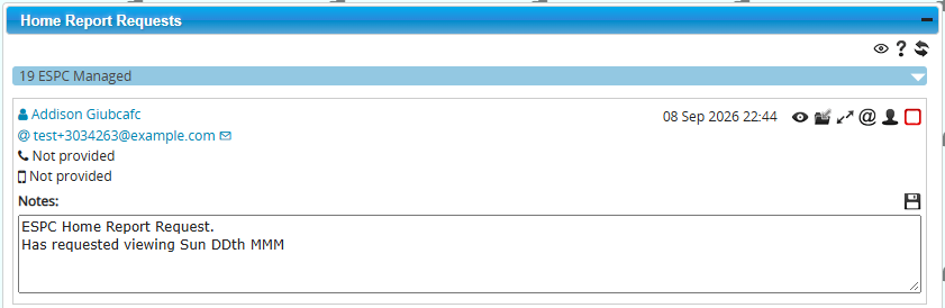
Actions You Can Take
You can manage enquiries directly from the widget using the following actions.
- Add a Note – Record an internal note to keep track of conversations, follow-ups, or additional information about the enquiry.
- Create a Viewing – Create a viewing appointment for the enquirer directly from the enquiry.
- Email the Enquirer – Send an email manually using one of your configured email templates.
- View Full Enquirer Details – Open the full contact record for the enquirer in a new browser tab.
- Mark as Actioned – Mark the enquiry as Actioned once it has been dealt with.
- Mark as Not Interested – If the enquirer confirms they are not interested in the property, you can record this using the Not Interested option.
- Archive the Enquiry – Archive the enquiry to remove it from the active list once it no longer requires attention.
Automatic Email Responses (Triggers)
Two trigger events are available for enquiries received from:
- ESPC – ESPC HR Request
- Your website – Home Report Request
These triggers allow you to automatically send an email when an enquiry is received. They are commonly used to automatically send:
- The Property Brochure
- A message inviting the enquirer to arrange a viewing
The email template used for these responses can be configured by your system Administrator.
Back to top.
 GDPR Opt-In / Opt-Out Status